
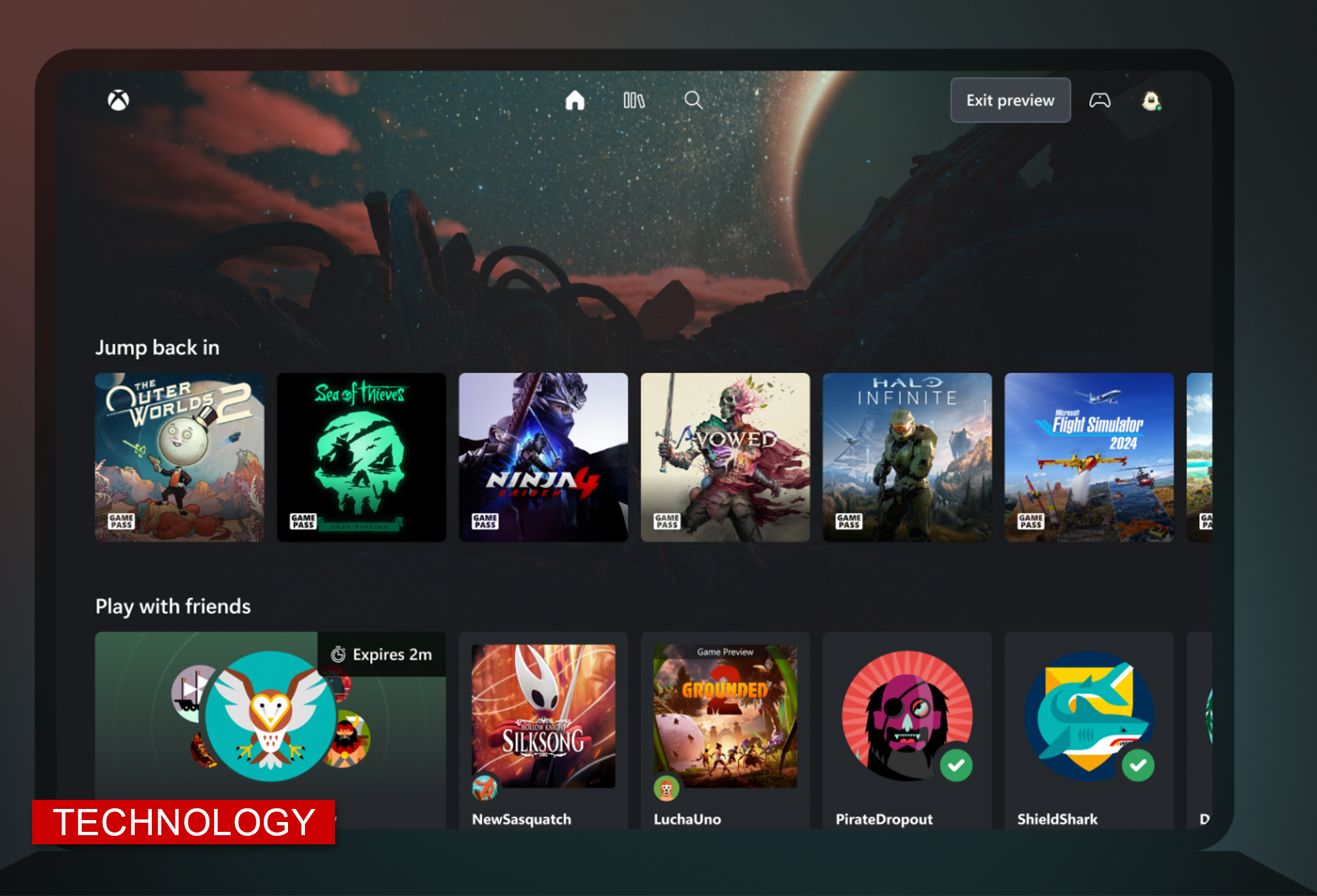
Playing newer PC and console games has traditionally meant having the right hardware, enough storage space, and time to download increasingly large files. Cloud gaming changes that by running the game somewhere else and streaming it to the device in front of the player.
The technology has been around for years, but it continues to expand across browsers, televisions, handhelds, phones, tablets, and computers. NVIDIA recently added Firefox support to GeForce NOW, while Xbox, Amazon, and PlayStation continue to expand their own cloud gaming services.
How Cloud Gaming Works
With cloud gaming, the game runs on hardware in a remote data center rather than on the player’s console or computer. Controller, keyboard, or mouse commands travel over the internet to that system, and the resulting video and audio are streamed back to the player.
That means a laptop or other device that might struggle to run a demanding game on its own can potentially stream it instead. Players can also avoid large installations, reduce the amount of storage they need, and move between supported devices without taking a gaming PC or console with them.
Cloud gaming does not necessarily mean the games are free. Depending on the service, players may need a subscription, may need to own the game through a supported digital store, or may have access to a rotating library as part of their membership.
What You Need to Play
Cloud gaming depends heavily on the quality and stability of the player’s internet connection. Cloud gaming has to send a player’s actions to a remote server and return the response quickly enough that the game still feels natural.
Bandwidth requirements vary. Xbox recommends 20 Mbps for consoles, PCs, and tablets, while mobile devices can use 10 Mbps. Amazon recommends at least 10 Mbps for Luna, and NVIDIA recommends at least 35 Mbps for GeForce NOW streaming at 1440p and 120 frames per second.
Speed is only part of the equation. Latency, or the time it takes information to travel between the player and the server, can have a noticeable effect. A connection that works perfectly well for streaming movies may still introduce delay during a competitive shooter, racing game, or fighting game.
Where Cloud Gaming Still Falls Short
A gaming PC or console still has advantages. Games running locally do not depend on a remote server for every button press, and players generally have more control over graphics settings, storage, hardware, accessories, and modifications.
Cloud libraries also vary between services, so owning a game does not guarantee that it can be streamed. Subscription costs can accumulate, and games included with a service may change over time.
The tradeoff is that local hardware can be expensive. A gaming PC capable of running newer releases at high resolutions and frame rates can require a significant upfront investment, while consoles and computers eventually need more storage or newer hardware.
Cloud Gaming Options
Players interested in cloud gaming now have several choices, with each service offering a different way to access and stream games.
GeForce NOW is built largely around supported PC games players already own through services such as Steam, Epic Games Store, Xbox, and Ubisoft. NVIDIA recently added Firefox support, allowing players to launch supported games directly through the browser.
Xbox Cloud Gaming is closely tied to Game Pass, although Microsoft has expanded the number of purchased games that subscribers can stream from their own libraries. Supported games can be played across computers, mobile devices, Xbox consoles, handhelds, select televisions, and other devices.
Amazon Luna streams games through Amazon Web Services and supports computers, phones, tablets, Fire TV devices, and select smart TVs. Prime members have access to a selection of games, while Luna Premium includes a larger library.
PlayStation Plus Premium members can stream select PS5 games without downloading them first, including supported titles on PS5 and PlayStation Portal.
Cloud Gaming or a Gaming PC?
Cloud gaming is unlikely to replace a gaming PC or console for every player. Someone with high-end hardware and a large local library may have little reason to change, while a player with fast internet and an older computer may find cloud gaming a much cheaper way to play newer titles.
What is changing is where those games can be played. As cloud services continue moving onto browsers, televisions, handhelds, and everyday computers, owning powerful gaming hardware is no longer the only way to access demanding games.





0 Comments